

Meals on Schedule
Even when you’re away.

OPEN FOR EARLY ACCESS
Coming Soon to Kickstarter
Early-bird pricing will be announced at launch.
Pre-production · Coming to Kickstarter
Load up to 8 verified compatible 3 oz (85 g) wet-food cans. KittyBOT keeps each can factory-sealed until mealtime, then automatically opens and serves the meal in the original can. After feeding, the used can and lid are collected automatically.
Coming soon to Kickstarter · No payment required.
Follow KittyBOT for launch updates and early-bird access.
Compatibility list coming before launch
Final features and specifications may change
Launch and early-bird details coming soon
KittyBOT Automatic Can-Opening Wet Food Feeder
Load up to 8 sealed 3 oz cans. KittyBOT opens and serves one automatically at each scheduled mealtime—even when you’re away.
Coming Soon to Kickstarter. Get launch updates and early-bird access. No payment required.Coming Soon to Kickstarter.
No pre-opening. No pre-portioning. No pre-opening, No pre-portioning.
Even when you’re away.
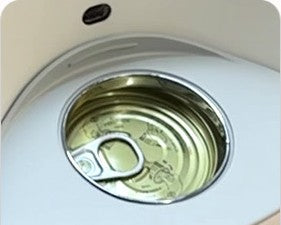
Each compatible can stays sealed until it’s time to serve.
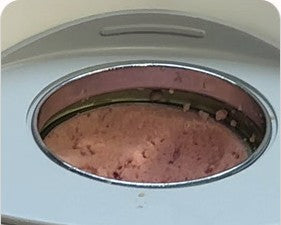
No daily can-opening or pre-portioning.
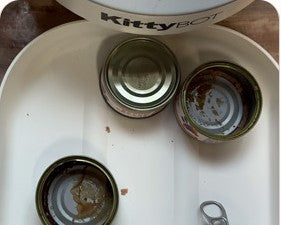
Collected automatically after feeding.
Even when you’re away.
Each compatible can stays sealed until it’s time to serve.
No daily can-opening or pre-portioning.
Collected automatically after feeding.
ALL-IN-ONE AUTOMATION
From sealed can to served meal—with less daily prep.
Up to 8 compatible 3 oz cans
App scheduling & Feed Now
Automatic used-can collection
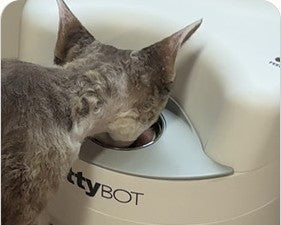
KittyBOT removes the lid before serving, so your cat can eat directly from the original can.
All-In-One Automation
From Sealed Can to Served Meal
Up to 8
compatible
3 oz cans
App scheduling
& Feed Now
Automatic used-can collection

KittyBOT removes the lid before presenting the meal,
so your cat can eat directly from the original can.
Great for workdays, weekends, and short trips.

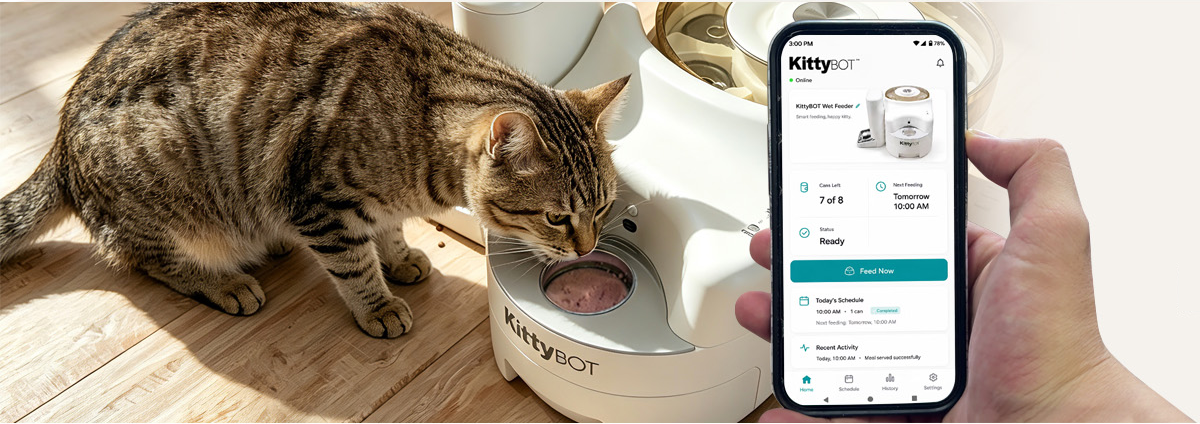
Control KittyBOT from anywhere
with the companion app.
App interface shown for illustration and
may change before launch.


Control KittyBOT from anywhere with the companion app.
App interface shown for illustration and may change before launch.

| Model | KWF-01 |
|---|---|
| Capacity | Up to 8 verified compatible cans |
| Can Format | Verified compatible 3 oz (85 g) round cans; target size approx. Ø68 × H35 mm. 5–5.5 oz cans are not supported in KWF-01. |
| Food Storage | Cans remain factory-sealed until scheduled mealtime; no active refrigeration |
| Serving | 1 can per meal; lid removed before serving |
| Can-Opening Safety | Can opening takes place in an enclosed area inaccessible to the pet |
| Used-Can Collection | Used can and lid are automatically collected into a removable compartment after feeding |
| Dimensions | Approx. 330 × 570 × 260 mm / 13.0 × 22.4 × 10.2 in |
| Feeding Height | 120 mm / 4.7 in |
| App Control | iOS & Android · Schedule · Feed Now · Cans Left · Device Status · History |
| Local Control | Physical FEED button to open and serve 1 can on demand |
| Connectivity | 2.4 / 5 GHz Wi-Fi + Bluetooth LE |
| Main Power | DC 5V / 3A adapter |
| Backup Power | External 5V USB Type-C power bank supported; no built-in battery |
| Cleaning | Removable used-can collection compartment for cleaning |
| Optional Accessory | Optional 2L Manual Dry Food Hopper. More flexibility for mixed wet-and-dry feeding. |

| Model | KWF-01 |
|---|---|
| Capacity | Up to 8 verified compatible cans |
| Can Format | Verified compatible 3 oz (85 g) round cans; target size approx. Ø68 × H35 mm. 5–5.5 oz cans are not supported in KWF-01. |
| Food Storage | Cans remain factory-sealed until scheduled mealtime; no active refrigeration |
| Serving | 1 can per meal; lid removed before serving |
| Can-Opening Safety | Can opening takes place in an enclosed area inaccessible to the pet |
| Used-Can Collection | Used can and lid are automatically collected into a removable compartment after feeding |
| Dimensions | Approx. 330 × 570 × 260 mm / 13.0 × 22.4 × 10.2 in |
| Feeding Height | 120 mm / 4.7 in |
| App Control | iOS & Android · Schedule · Feed Now · Cans Left · Device Status · History |
| Local Control | Physical FEED button to open and serve 1 can on demand |
| Connectivity | 2.4 / 5 GHz Wi-Fi + Bluetooth LE |
| Main Power | DC 5V / 3A adapter |
| Backup Power | External 5V USB Type-C power bank supported; no built-in battery |
| Cleaning | Removable used-can collection compartment for cleaning |
| Optional Accessory | Optional 2L Manual Dry Food Hopper. More flexibility for mixed wet-and-dry feeding. |
The first version of KittyBOT is designed for verified compatible 3 oz (approximately 85 g) round cat-food cans, with target can dimensions of approximately Ø68 mm by H35 mm (2.68 × 1.38 in).
Many 3 oz cans sold in the U.S. use similar dimensions, but can geometry, rim shape, lid and pull-tab design, and manufacturing tolerances can still vary by brand and SKU. For this reason, matching the target dimensions alone does not guarantee compatibility. Each compatible can is tested through KittyBOT's full feeding cycle—loading, detection, dispensing, opening, lid removal, serving, and used-can collection—rather than being approved based on size alone.
We will publish a Verified Can Compatibility List before launch, and continue adding compatible cans as testing expands. Both gravy-style and more solid wet-food textures can be used as long as the can itself is verified compatible. Based on our current testing, wet foods with some moisture or gravy generally provide an easier direct-from-can eating experience.
No. Compatible cans remains unopened and sealed until their scheduled meal.
After the feeding period, KittyBOT moves used can to waste compartment
Up to 8 cans.
Every cat is different, and some cats are more sensitive to whisker contact than others.
In our current testing, many cats have been able to eat comfortably and finish their meals directly from compatible 3 oz cans. We’re also designing the feeding area with an outward-flared shape to help reduce unnecessary contact between your cat’s whiskers and the feeder itself.
Serving straight from the original can also means less food transfer, fewer food-contact surfaces, and fewer extra dishes to wash.
We’ll continue testing with real cats and share more real feeding videos as development moves forward.
KittyBOT is designed so the can-opening process takes place inside an enclosed mechanical area that your cat cannot directly access.
The lid is removed before the meal is presented, and the cutting mechanism is not exposed in the feeding area.
KittyBOT also uses pet-detection inputs as part of its safety control logic. If a cat is detected near a restricted movement area, related mechanical actions are designed to pause, delay, or remain disabled until the area is clear.
We’re continuing real-cat and fault-condition testing as part of product validation before launch.
We take opened-can safety seriously.
The cutting process happens inside the machine, away from the feeding area, and the lid is removed before the can is presented to your cat. We’re validating the opened-can edge across compatible cans as part of our compatibility testing.
In our current real-cat testing, cats have been willing to eat directly from the opened cans, and we’ll continue testing across different compatible brands and can structures before launch.
KittyBOT uses a configurable Meal Window to control how long the current meal remains available.
The current default Meal Window is 8 hours and can be adjusted from 30 minutes to 24 hours. When the Meal Window ends, KittyBOT is designed to collect the used can once the feeding area is clear. If a pet is still detected, the feeder waits until the area is clear before collecting the can.
If you start a new Feed Now meal while a previous meal is still active, KittyBOT is designed to safely collect the current can first and then prepare the new meal, provided the required safety conditions are met.
The Meal Window is a device setting, not a food-safety guarantee. KittyBOT does not refrigerate opened wet food, so users should follow the storage and feeding guidance provided by their pet-food manufacturer and veterinarian.
KittyBOT is designed to reduce food transfer by serving wet food directly from the original can.
Key areas are also designed with cleaning in mind. The feeding-area can holder and used-can collection compartment are designed to be removable for cleaning, and the used-can compartment can be emptied directly without disposable garbage bags.
The can-opening area is also designed to be accessible for routine cleaning. Final washing instructions and the exact list of washable parts will be confirmed before production and included in the user manual.
KittyBOT is being designed with position sensing, timeouts, motor-current monitoring, and fault handling throughout the feeding process.
If a recoverable issue occurs, the system may attempt a controlled recovery. If the issue cannot be safely resolved, the feeder is designed to stop the affected mechanical process rather than continue blindly.
The app and device status indicators are intended to let the user know when attention is needed and provide the next troubleshooting step.
KittyBOT uses a 5V / 3A power adapter as its primary power source.
It also supports an external 5V USB Type-C power bank as a backup power source. If the main adapter loses power and a compatible power bank is connected, the feeder can continue operating from backup power, subject to the power bank’s available capacity and output capability.
The app is designed to show whether the feeder is running from the adapter or backup power.
KittyBOT does not contain a built-in battery, and the main adapter does not charge the external power bank.
Yes. Once a feeding schedule has been successfully synchronized to the device, KittyBOT is designed to keep that schedule locally.
If the internet connection is temporarily lost, the device can continue executing the synchronized feeding schedule based on its local time.
Remote app functions, cloud status, and notifications may be temporarily unavailable while the device is offline, but the local schedule does not depend on a continuous internet connection.
Yes. KittyBOT includes a physical FEED button for local feeding.
The app provides the more advanced experience, including meal schedules, Feed Now, cans remaining, device status, feeding history, and other settings. Users who prefer not to rely on the app can still access basic local feeding from the device itself.
The first-generation KittyBOT holds up to 8 compatible 3 oz cans, with one can served per meal.
How long 8 cans lasts depends on your feeding routine. At one can per day, that provides up to 8 scheduled meals. At two cans per day, it provides up to 4 days of meals. Multi-cat households or higher-frequency feeding will naturally use the available cans more quickly.
KittyBOT is designed to make remaining inventory easy to check. The storage area can be visually inspected, and the app shows cans remaining when inventory data is available. The system is also designed to provide low-can and no-can alerts so users can refill before the feeder runs out.
We know some multi-cat households want more capacity, and larger-capacity formats are an important direction for future product development.
KittyBOT’s core product is an automatic canned wet-food feeder.
An optional manual dry-food storage accessory is also planned for households that use both wet and dry food.
The first-generation dry-food accessory does not include motorized dispensing, automatic dry-food scheduling, or app-controlled dry-food feeding. It is intended as a simple companion accessory for mixed wet-and-dry feeding routines.
Once our Kickstarter campaign goes live, simply visit our campaign page, choose your preferred reward or early-bird offer, and complete your payment directly through Indiegogo. Your order will then be processed according to the campaign's fulfillment schedule.
After the Indiegogo campaign ends, we will move into production and fulfillment. We will keep backers updated throughout the process.
Simply sign up on this page with your email address. After signing up, you'll receive an email with a short survey. Complete the survey to qualify for our FREE Early Access offer.
Once you complete the survey, you'll be eligible to lock in our FREE Early Bird access and price before the Indiegogo campaign launches.
Yes! We have 100 FREE Early Bird access spots available for eligible subscribers who complete the survey.
Sign up on the pre-launch page, complete the survey sent to your email, and follow the instructions provided to claim your Early Bird access. Spots are limited to the first 100 eligible participants.
Don't worry—you can still get Early Bird access. Once the 100 free spots are claimed, new qualified subscribers can pay a small down payment to secure Early Bird access and lock in the special Early Bird price.
Early subscribers get the opportunity to secure limited Early Bird pricing before the campaign goes live. The first 100 eligible participants can claim Early Bird access for free, while additional spots may require a down payment.
You can still secure Early Bird pricing by following the post-limit Early Access offer and paying the required down payment.
Yes. Early Access reserves your eligibility for the Early Bird offer; it does not mean the entire product is free. You will complete the remaining purchase/payment through the applicable Kickstarter campaign process according to the Early Bird offer terms.
We'll send the survey and Early Bird instructions to the email address you used to sign up. Be sure to check your inbox and spam/junk folder.
Feedback from early product testing. Product experience and final specifications may change before launch.
Early Tester feedback
“What I like most is knowing my cat can still get wet food on schedule when I’m not home. The can stays sealed until mealtime, and KittyBOT opens and serves it when it’s time to eat. Having the backup power option also gives me extra peace of mind when I’m away.”
Early Tester feedback
“I was initially concerned about whisker contact, but both of my cats ate comfortably from the 3 oz cans. They didn’t hesitate, and the feeding position and height felt natural for them.”
Early Tester feedback
“I like having automatic wet-food feeding as the main system, plus the optional manual dry-food hopper. It gives me a practical way to keep both wet and dry food available as part of the same feeding setup.”

